> ## Documentation Index
> Fetch the complete documentation index at: https://docs-dev-feat-docs-5554-self-service.mintlify.site/llms.txt
> Use this file to discover all available pages before exploring further.

> Learn how to configure an update policy form using Forms for Actions for users to review and accept new terms of service or consent updates.

# Use Cases: Configure an update policy form using Forms

<Card title="Before you start">
  1. Create a [Machine-to-Machine Application](/docs/get-started/auth0-overview/create-applications/machine-to-machine-apps) with the following scopes enabled:

  * `read:users`
  * `update:users`
  * `create:users`
  * `read:users_app_metadata`
  * `update:users_app_metadata`
  * `create:users_app_metadata`

  2. Add a [Vault connection](/docs/customize/forms/vault) using the M2M application credentials.
</Card>

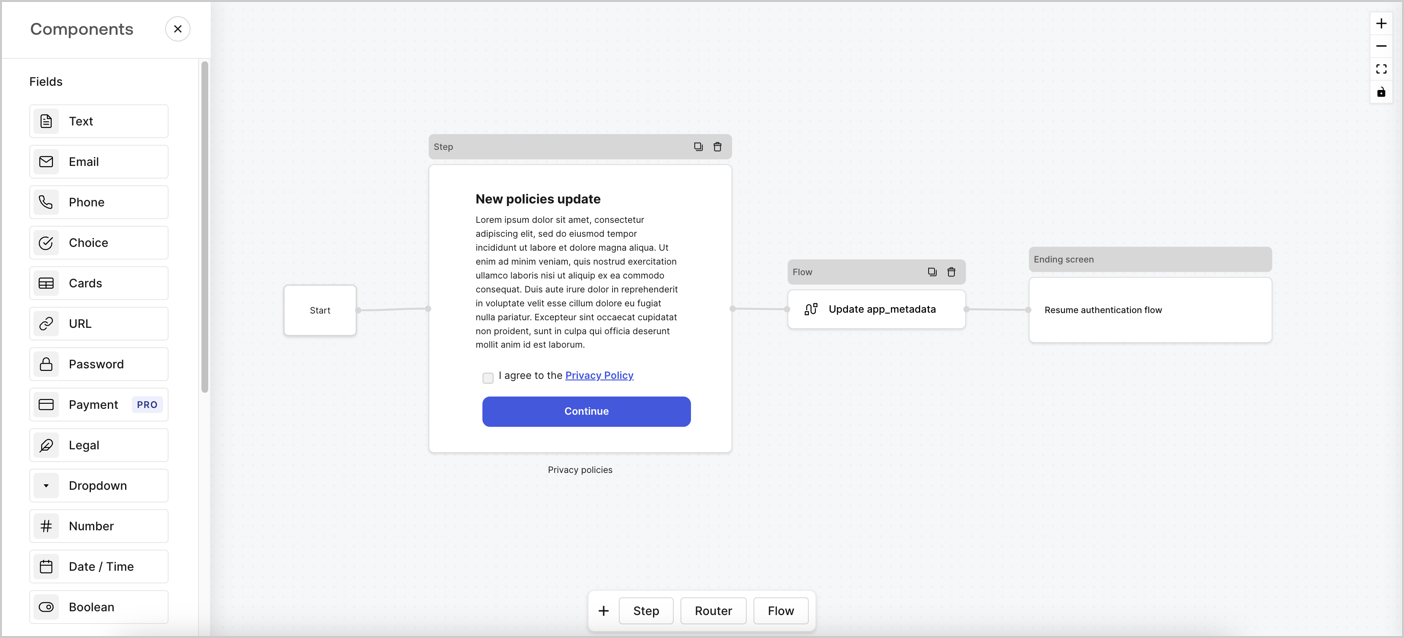
Forms for Actions allows you to create custom privacy policies flows and store the consent under the `app_metadata` object.
<Frame>
  <img src="https://mintcdn.com/docs-dev-feat-docs-5554-self-service/H1-Mn-I9ZUEtuHdB/docs/images/cdy7uua7fh8z/6i68dMvHDTijfRmSgN1x8Q/ad900e7d4c0fb34645921435472b8684/privavy-policy-form.png?fit=max&auto=format&n=H1-Mn-I9ZUEtuHdB&q=85&s=2a878733066e2ebc70c3b861367f81ea" alt="Dashboard > Actions > Forms > Privacy policy use case" data-og-width="1404" width="1404" data-og-height="638" height="638" data-path="docs/images/cdy7uua7fh8z/6i68dMvHDTijfRmSgN1x8Q/ad900e7d4c0fb34645921435472b8684/privavy-policy-form.png" data-optimize="true" data-opv="3" srcset="https://mintcdn.com/docs-dev-feat-docs-5554-self-service/H1-Mn-I9ZUEtuHdB/docs/images/cdy7uua7fh8z/6i68dMvHDTijfRmSgN1x8Q/ad900e7d4c0fb34645921435472b8684/privavy-policy-form.png?w=280&fit=max&auto=format&n=H1-Mn-I9ZUEtuHdB&q=85&s=d2364a92e560891f22321bc107e5a143 280w, https://mintcdn.com/docs-dev-feat-docs-5554-self-service/H1-Mn-I9ZUEtuHdB/docs/images/cdy7uua7fh8z/6i68dMvHDTijfRmSgN1x8Q/ad900e7d4c0fb34645921435472b8684/privavy-policy-form.png?w=560&fit=max&auto=format&n=H1-Mn-I9ZUEtuHdB&q=85&s=e0b112dd1384c02178d8c0aafd55b913 560w, https://mintcdn.com/docs-dev-feat-docs-5554-self-service/H1-Mn-I9ZUEtuHdB/docs/images/cdy7uua7fh8z/6i68dMvHDTijfRmSgN1x8Q/ad900e7d4c0fb34645921435472b8684/privavy-policy-form.png?w=840&fit=max&auto=format&n=H1-Mn-I9ZUEtuHdB&q=85&s=863ed1fd7810956fe8917c818acd1eee 840w, https://mintcdn.com/docs-dev-feat-docs-5554-self-service/H1-Mn-I9ZUEtuHdB/docs/images/cdy7uua7fh8z/6i68dMvHDTijfRmSgN1x8Q/ad900e7d4c0fb34645921435472b8684/privavy-policy-form.png?w=1100&fit=max&auto=format&n=H1-Mn-I9ZUEtuHdB&q=85&s=c49f62194a79ff4fc35f65da756e1fa7 1100w, https://mintcdn.com/docs-dev-feat-docs-5554-self-service/H1-Mn-I9ZUEtuHdB/docs/images/cdy7uua7fh8z/6i68dMvHDTijfRmSgN1x8Q/ad900e7d4c0fb34645921435472b8684/privavy-policy-form.png?w=1650&fit=max&auto=format&n=H1-Mn-I9ZUEtuHdB&q=85&s=098751260b948fd9496857489e15d34a 1650w, https://mintcdn.com/docs-dev-feat-docs-5554-self-service/H1-Mn-I9ZUEtuHdB/docs/images/cdy7uua7fh8z/6i68dMvHDTijfRmSgN1x8Q/ad900e7d4c0fb34645921435472b8684/privavy-policy-form.png?w=2500&fit=max&auto=format&n=H1-Mn-I9ZUEtuHdB&q=85&s=2f52612f2efe14b7448e862fc93659e1 2500w" />
</Frame>

The sections below outline how you can create an Update Policy form using nodes and flows, along with steps for adding your form to a [Post Login](/docs/customize/actions/explore-triggers/signup-and-login-triggers/login-trigger) Action.

## Create a form from scratch

Follow these steps to create a form to gather information:

1. Open the Form editor by selecting **Auth0 Dashboard > Actions > Forms.**
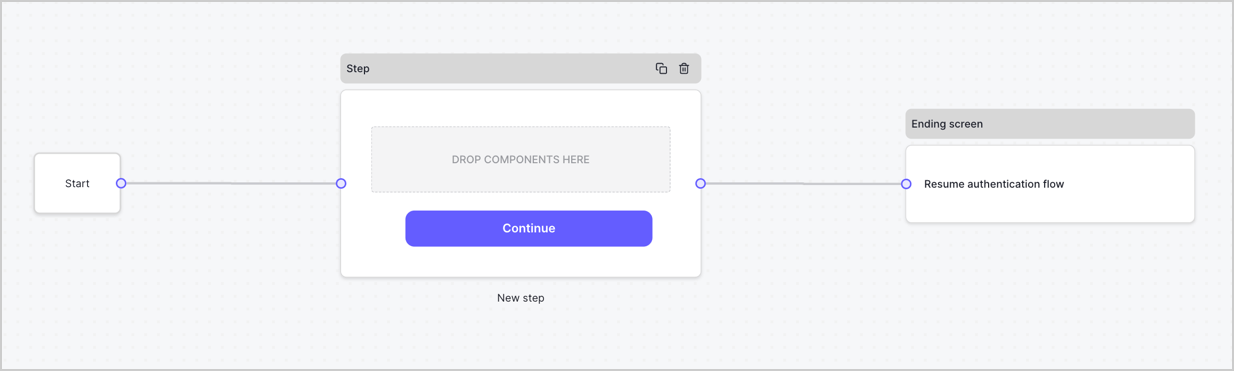
2. Select **Create Form** > **Start from scratch**.

By default, a new form contains a Start node, a Step node, and an Ending screen node.
<Frame>
  <img src="https://mintcdn.com/docs-dev-feat-docs-5554-self-service/r0PUJlF9UbZWx_MZ/docs/images/cdy7uua7fh8z/2TZ9jSjgEcARFpULI6hz4R/a4319a1bd482f2ee5cc23100fdb2f42c/New-form-Forms-for-action-use-case.png?fit=max&auto=format&n=r0PUJlF9UbZWx_MZ&q=85&s=b6d2d9ea0dac8298614a1ed6d035fbb5" alt="Dashboard > Forms > Use Cases > Form" data-og-width="1234" width="1234" data-og-height="371" height="371" data-path="docs/images/cdy7uua7fh8z/2TZ9jSjgEcARFpULI6hz4R/a4319a1bd482f2ee5cc23100fdb2f42c/New-form-Forms-for-action-use-case.png" data-optimize="true" data-opv="3" srcset="https://mintcdn.com/docs-dev-feat-docs-5554-self-service/r0PUJlF9UbZWx_MZ/docs/images/cdy7uua7fh8z/2TZ9jSjgEcARFpULI6hz4R/a4319a1bd482f2ee5cc23100fdb2f42c/New-form-Forms-for-action-use-case.png?w=280&fit=max&auto=format&n=r0PUJlF9UbZWx_MZ&q=85&s=8150647c789f27770285463967fea846 280w, https://mintcdn.com/docs-dev-feat-docs-5554-self-service/r0PUJlF9UbZWx_MZ/docs/images/cdy7uua7fh8z/2TZ9jSjgEcARFpULI6hz4R/a4319a1bd482f2ee5cc23100fdb2f42c/New-form-Forms-for-action-use-case.png?w=560&fit=max&auto=format&n=r0PUJlF9UbZWx_MZ&q=85&s=5139ad1e52ea4736f5f90d2352720653 560w, https://mintcdn.com/docs-dev-feat-docs-5554-self-service/r0PUJlF9UbZWx_MZ/docs/images/cdy7uua7fh8z/2TZ9jSjgEcARFpULI6hz4R/a4319a1bd482f2ee5cc23100fdb2f42c/New-form-Forms-for-action-use-case.png?w=840&fit=max&auto=format&n=r0PUJlF9UbZWx_MZ&q=85&s=171fb923c68f6752e0a63eef3e11d529 840w, https://mintcdn.com/docs-dev-feat-docs-5554-self-service/r0PUJlF9UbZWx_MZ/docs/images/cdy7uua7fh8z/2TZ9jSjgEcARFpULI6hz4R/a4319a1bd482f2ee5cc23100fdb2f42c/New-form-Forms-for-action-use-case.png?w=1100&fit=max&auto=format&n=r0PUJlF9UbZWx_MZ&q=85&s=f15118fbff62cb8a95991b8850d01387 1100w, https://mintcdn.com/docs-dev-feat-docs-5554-self-service/r0PUJlF9UbZWx_MZ/docs/images/cdy7uua7fh8z/2TZ9jSjgEcARFpULI6hz4R/a4319a1bd482f2ee5cc23100fdb2f42c/New-form-Forms-for-action-use-case.png?w=1650&fit=max&auto=format&n=r0PUJlF9UbZWx_MZ&q=85&s=a1bc72d70e3f4485e41a4e8b35fbc4fa 1650w, https://mintcdn.com/docs-dev-feat-docs-5554-self-service/r0PUJlF9UbZWx_MZ/docs/images/cdy7uua7fh8z/2TZ9jSjgEcARFpULI6hz4R/a4319a1bd482f2ee5cc23100fdb2f42c/New-form-Forms-for-action-use-case.png?w=2500&fit=max&auto=format&n=r0PUJlF9UbZWx_MZ&q=85&s=303dd914257099fce907208f1e629bcc 2500w" />
</Frame>

### Configure the Step node

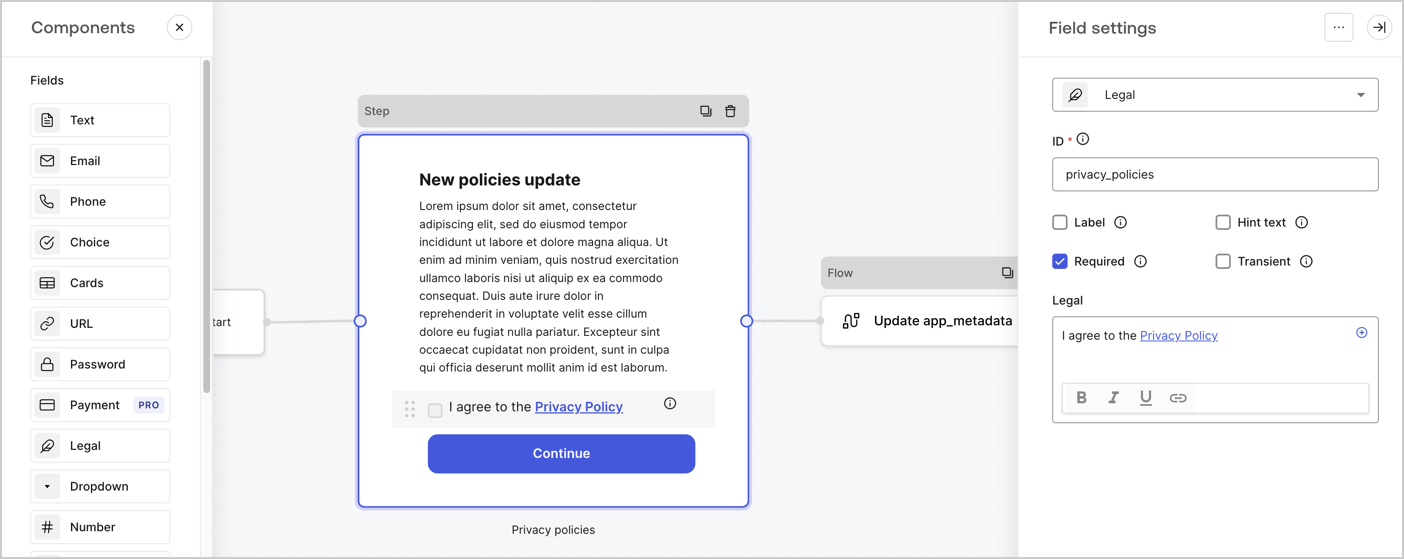
The Step node is the graphical interface visible to users. Add [Fields](/docs/customize/forms/nodes-and-components) to the Step node to collect the new agreement acceptance value by following these steps:

1. Drag a **Rich text** field from the **Components menu** into the **Step** node.

   * **Rich text**: Enter a description of your privacy policies updates.
   * Select **Save**.
2. Drag a **Legal** field into the **Step** node.

   * **ID**: Enter `privacy_policies`.
   * **Required**: Enable the checkbox.
   * **Legal**: Enter `I agree to the Privacy Policy`.
   * Select **Save**.
3. Select **Publish** to save.
<Frame>
  <img src="https://mintcdn.com/docs-dev-feat-docs-5554-self-service/jnDsvxOsouB0MQqU/docs/images/cdy7uua7fh8z/59zFFjQjAnjogkc2QGIqqJ/0ad66b1b636544122aa4e65968b76c2c/privacy-policy-step-node.png?fit=max&auto=format&n=jnDsvxOsouB0MQqU&q=85&s=5bd406210570059f499643531cfd52f6" alt="Dashboard > Actions > Forms > Use case privacy policy step node" data-og-width="1404" width="1404" data-og-height="559" height="559" data-path="docs/images/cdy7uua7fh8z/59zFFjQjAnjogkc2QGIqqJ/0ad66b1b636544122aa4e65968b76c2c/privacy-policy-step-node.png" data-optimize="true" data-opv="3" srcset="https://mintcdn.com/docs-dev-feat-docs-5554-self-service/jnDsvxOsouB0MQqU/docs/images/cdy7uua7fh8z/59zFFjQjAnjogkc2QGIqqJ/0ad66b1b636544122aa4e65968b76c2c/privacy-policy-step-node.png?w=280&fit=max&auto=format&n=jnDsvxOsouB0MQqU&q=85&s=2cdc3795807806043a680c43f47d6ec9 280w, https://mintcdn.com/docs-dev-feat-docs-5554-self-service/jnDsvxOsouB0MQqU/docs/images/cdy7uua7fh8z/59zFFjQjAnjogkc2QGIqqJ/0ad66b1b636544122aa4e65968b76c2c/privacy-policy-step-node.png?w=560&fit=max&auto=format&n=jnDsvxOsouB0MQqU&q=85&s=e78e92a63bfcfc55188df26df7bb66d1 560w, https://mintcdn.com/docs-dev-feat-docs-5554-self-service/jnDsvxOsouB0MQqU/docs/images/cdy7uua7fh8z/59zFFjQjAnjogkc2QGIqqJ/0ad66b1b636544122aa4e65968b76c2c/privacy-policy-step-node.png?w=840&fit=max&auto=format&n=jnDsvxOsouB0MQqU&q=85&s=bb0797808dfe173080052196dd3bf8dc 840w, https://mintcdn.com/docs-dev-feat-docs-5554-self-service/jnDsvxOsouB0MQqU/docs/images/cdy7uua7fh8z/59zFFjQjAnjogkc2QGIqqJ/0ad66b1b636544122aa4e65968b76c2c/privacy-policy-step-node.png?w=1100&fit=max&auto=format&n=jnDsvxOsouB0MQqU&q=85&s=ff5149f1379330ce62a74c39adf43a9f 1100w, https://mintcdn.com/docs-dev-feat-docs-5554-self-service/jnDsvxOsouB0MQqU/docs/images/cdy7uua7fh8z/59zFFjQjAnjogkc2QGIqqJ/0ad66b1b636544122aa4e65968b76c2c/privacy-policy-step-node.png?w=1650&fit=max&auto=format&n=jnDsvxOsouB0MQqU&q=85&s=53718c8a339873c6b6d53636421d42d4 1650w, https://mintcdn.com/docs-dev-feat-docs-5554-self-service/jnDsvxOsouB0MQqU/docs/images/cdy7uua7fh8z/59zFFjQjAnjogkc2QGIqqJ/0ad66b1b636544122aa4e65968b76c2c/privacy-policy-step-node.png?w=2500&fit=max&auto=format&n=jnDsvxOsouB0MQqU&q=85&s=ed1b0dc7de8bbe5c613e7481b8684dc8 2500w" />
</Frame>

### Configure the Flow node

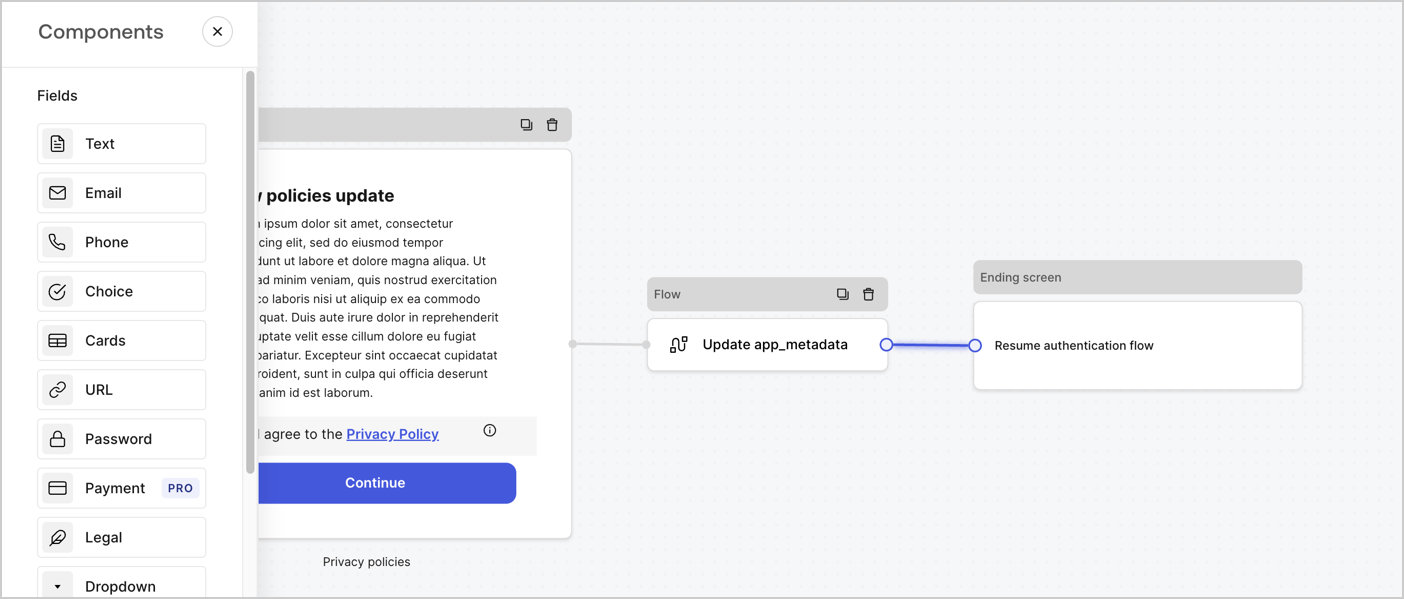
Add a **Flow** node after the **Step** node to update the `app_metadata` and resume the authentication flow by following these steps:

1. Select **Flow** from the bottom of the Form editor.
2. Remove the existing link between the **Step** and **Ending Screen** nodes.
3. Select the new **Flow** > **Click to add a flow** > **Create a new flow.**

   * Enter `Update app_metadata` in the **Name** field.
   * Select **Create**.
   * Select **Save**.
4. Link the **Flow** node to the **Step** and **Ending Screen** nodes as pictured below.
5. Select **Publish** to save.
<Frame>
  <img src="https://mintcdn.com/docs-dev-feat-docs-5554-self-service/H1-Mn-I9ZUEtuHdB/docs/images/cdy7uua7fh8z/6YIkzm7SrpM9LW76AXuRzh/353c518fe82bbaa440836da1d83596d6/link-policies.png?fit=max&auto=format&n=H1-Mn-I9ZUEtuHdB&q=85&s=32b7c979d7e4eb4833e01a439643f58b" alt="Dashboard > Actions > Forms > Form" data-og-width="1404" width="1404" data-og-height="599" height="599" data-path="docs/images/cdy7uua7fh8z/6YIkzm7SrpM9LW76AXuRzh/353c518fe82bbaa440836da1d83596d6/link-policies.png" data-optimize="true" data-opv="3" srcset="https://mintcdn.com/docs-dev-feat-docs-5554-self-service/H1-Mn-I9ZUEtuHdB/docs/images/cdy7uua7fh8z/6YIkzm7SrpM9LW76AXuRzh/353c518fe82bbaa440836da1d83596d6/link-policies.png?w=280&fit=max&auto=format&n=H1-Mn-I9ZUEtuHdB&q=85&s=3c3241382a92a42e2b90ad003550de4a 280w, https://mintcdn.com/docs-dev-feat-docs-5554-self-service/H1-Mn-I9ZUEtuHdB/docs/images/cdy7uua7fh8z/6YIkzm7SrpM9LW76AXuRzh/353c518fe82bbaa440836da1d83596d6/link-policies.png?w=560&fit=max&auto=format&n=H1-Mn-I9ZUEtuHdB&q=85&s=3fcb8f04de867ffdf2edc7621e0bf353 560w, https://mintcdn.com/docs-dev-feat-docs-5554-self-service/H1-Mn-I9ZUEtuHdB/docs/images/cdy7uua7fh8z/6YIkzm7SrpM9LW76AXuRzh/353c518fe82bbaa440836da1d83596d6/link-policies.png?w=840&fit=max&auto=format&n=H1-Mn-I9ZUEtuHdB&q=85&s=1d60642a04df4235ed61a44655f6c1e0 840w, https://mintcdn.com/docs-dev-feat-docs-5554-self-service/H1-Mn-I9ZUEtuHdB/docs/images/cdy7uua7fh8z/6YIkzm7SrpM9LW76AXuRzh/353c518fe82bbaa440836da1d83596d6/link-policies.png?w=1100&fit=max&auto=format&n=H1-Mn-I9ZUEtuHdB&q=85&s=b83fb7c3fbd2c84a55fec996f07d62fb 1100w, https://mintcdn.com/docs-dev-feat-docs-5554-self-service/H1-Mn-I9ZUEtuHdB/docs/images/cdy7uua7fh8z/6YIkzm7SrpM9LW76AXuRzh/353c518fe82bbaa440836da1d83596d6/link-policies.png?w=1650&fit=max&auto=format&n=H1-Mn-I9ZUEtuHdB&q=85&s=16413ea0d392dbe07d599c1e8eb1d0d0 1650w, https://mintcdn.com/docs-dev-feat-docs-5554-self-service/H1-Mn-I9ZUEtuHdB/docs/images/cdy7uua7fh8z/6YIkzm7SrpM9LW76AXuRzh/353c518fe82bbaa440836da1d83596d6/link-policies.png?w=2500&fit=max&auto=format&n=H1-Mn-I9ZUEtuHdB&q=85&s=d16c23c9acc99f1e8f71ff436c3e7c2d 2500w" />
</Frame>

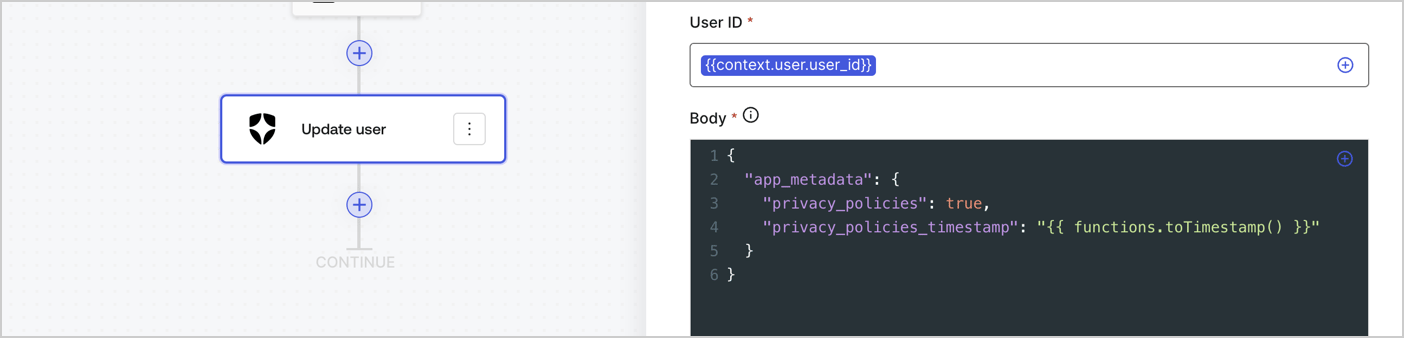
Add an Auth0 Update user action to the flow by following these steps:

1. Select the **Flow** **Update app\_metadata** > **Edit flow** to open the Flow editor in a new tab.
2. Below the StartAction, select the **+** icon to add an **Update user** action. Complete the fields below, then select **Save** to continue.

   * **Connection**: Select from the dropdown the Vault connection to your M2M application.

   * **User ID**: Enter `{{context.user.user_id}}`.

   * **Body**: Copy and paste the following code to update the app\_metadata with the privacy\_policies and privacy\_policies\_timestamp properties.

     ```text lines theme={null}
     {
       "app_metadata": {
         "privacy_policies": true,
         "privacy_policies_timestamp": "{{ functions.toTimestamp() }}"
       }
     }
     ```

   * Select **Save**.
3. Select **Publish** to save.
<Frame>
  <img src="https://mintcdn.com/docs-dev-feat-docs-5554-self-service/jNLs1H3unbuIG9Xp/docs/images/cdy7uua7fh8z/CvMNIwWrOUwaFW4X3G28p/1fb70ae57a20749d9ffaaba8dc0b7e26/update-user-privacy.png?fit=max&auto=format&n=jNLs1H3unbuIG9Xp&q=85&s=25aa55ace197e351c59faf16771893ca" alt="Dashboard > Actions > Forms > User case privacy policy code" data-og-width="1404" width="1404" data-og-height="338" height="338" data-path="docs/images/cdy7uua7fh8z/CvMNIwWrOUwaFW4X3G28p/1fb70ae57a20749d9ffaaba8dc0b7e26/update-user-privacy.png" data-optimize="true" data-opv="3" srcset="https://mintcdn.com/docs-dev-feat-docs-5554-self-service/jNLs1H3unbuIG9Xp/docs/images/cdy7uua7fh8z/CvMNIwWrOUwaFW4X3G28p/1fb70ae57a20749d9ffaaba8dc0b7e26/update-user-privacy.png?w=280&fit=max&auto=format&n=jNLs1H3unbuIG9Xp&q=85&s=87ebb3e2b5f81c073616780d9569b4e2 280w, https://mintcdn.com/docs-dev-feat-docs-5554-self-service/jNLs1H3unbuIG9Xp/docs/images/cdy7uua7fh8z/CvMNIwWrOUwaFW4X3G28p/1fb70ae57a20749d9ffaaba8dc0b7e26/update-user-privacy.png?w=560&fit=max&auto=format&n=jNLs1H3unbuIG9Xp&q=85&s=0bb1347d77adc4fd50549007f07953af 560w, https://mintcdn.com/docs-dev-feat-docs-5554-self-service/jNLs1H3unbuIG9Xp/docs/images/cdy7uua7fh8z/CvMNIwWrOUwaFW4X3G28p/1fb70ae57a20749d9ffaaba8dc0b7e26/update-user-privacy.png?w=840&fit=max&auto=format&n=jNLs1H3unbuIG9Xp&q=85&s=b229394e85f976985c760387c105b479 840w, https://mintcdn.com/docs-dev-feat-docs-5554-self-service/jNLs1H3unbuIG9Xp/docs/images/cdy7uua7fh8z/CvMNIwWrOUwaFW4X3G28p/1fb70ae57a20749d9ffaaba8dc0b7e26/update-user-privacy.png?w=1100&fit=max&auto=format&n=jNLs1H3unbuIG9Xp&q=85&s=0e4a815e59446036315836311629694f 1100w, https://mintcdn.com/docs-dev-feat-docs-5554-self-service/jNLs1H3unbuIG9Xp/docs/images/cdy7uua7fh8z/CvMNIwWrOUwaFW4X3G28p/1fb70ae57a20749d9ffaaba8dc0b7e26/update-user-privacy.png?w=1650&fit=max&auto=format&n=jNLs1H3unbuIG9Xp&q=85&s=ec29e4fd8248f7b400f1ca9134dd22ac 1650w, https://mintcdn.com/docs-dev-feat-docs-5554-self-service/jNLs1H3unbuIG9Xp/docs/images/cdy7uua7fh8z/CvMNIwWrOUwaFW4X3G28p/1fb70ae57a20749d9ffaaba8dc0b7e26/update-user-privacy.png?w=2500&fit=max&auto=format&n=jNLs1H3unbuIG9Xp&q=85&s=ca592e79d47888ba50cbcfcfe7fadce6 2500w" />
</Frame>

<Callout icon="file-lines" color="#0EA5E9" iconType="regular">
  The flow **Update app\_metadata** adds a `privacy_policies true` value to the app`_metadata` object and also generates a timestamp with a [helper function.](/docs/customize/forms/variables)
</Callout>

## Retrieve the form render code

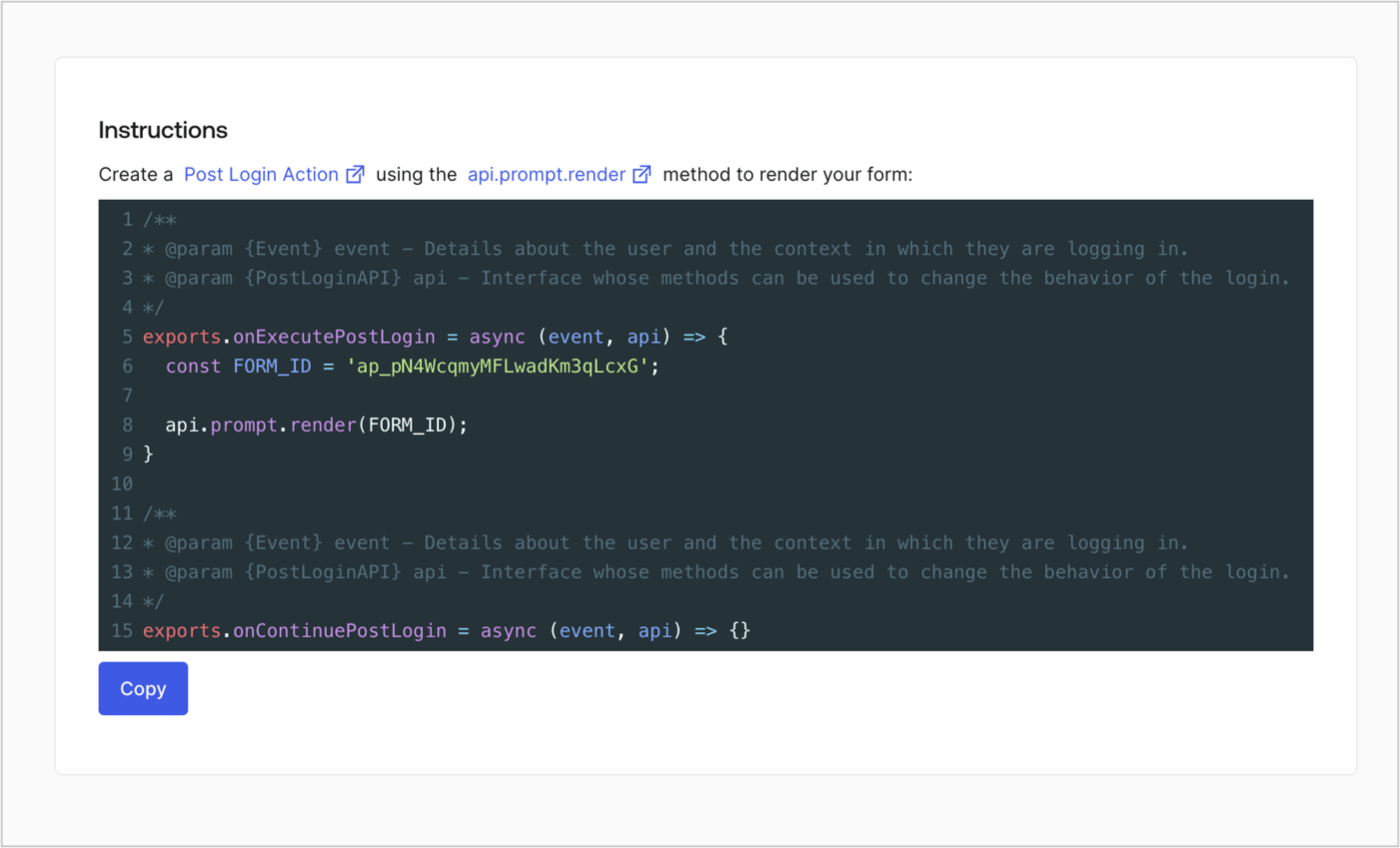
Retrieve your form render code to visually render the form with a custom Post Login Action by following these steps:

* From the Form editor, select **`<> Render`**.
* Select **Copy**.
<Frame>
  <img src="https://mintcdn.com/docs-dev-feat-docs-5554-self-service/cNqoSrKPlcOzR7Nh/docs/images/cdy7uua7fh8z/2EIUzc539sq9lwoTKbjoJv/496a864c0fc44a782c9cadca119dbfb0/embed.png?fit=max&auto=format&n=cNqoSrKPlcOzR7Nh&q=85&s=5c6d5a512237bff3f573b0cef4213450" alt="Dashboard > Actions > Forms > Form > Embed" data-og-width="1400" width="1400" data-og-height="848" height="848" data-path="docs/images/cdy7uua7fh8z/2EIUzc539sq9lwoTKbjoJv/496a864c0fc44a782c9cadca119dbfb0/embed.png" data-optimize="true" data-opv="3" srcset="https://mintcdn.com/docs-dev-feat-docs-5554-self-service/cNqoSrKPlcOzR7Nh/docs/images/cdy7uua7fh8z/2EIUzc539sq9lwoTKbjoJv/496a864c0fc44a782c9cadca119dbfb0/embed.png?w=280&fit=max&auto=format&n=cNqoSrKPlcOzR7Nh&q=85&s=a427368e35bf0642c0377e2b69e16435 280w, https://mintcdn.com/docs-dev-feat-docs-5554-self-service/cNqoSrKPlcOzR7Nh/docs/images/cdy7uua7fh8z/2EIUzc539sq9lwoTKbjoJv/496a864c0fc44a782c9cadca119dbfb0/embed.png?w=560&fit=max&auto=format&n=cNqoSrKPlcOzR7Nh&q=85&s=0e0f29291b626e3b5054fccf9c4c3632 560w, https://mintcdn.com/docs-dev-feat-docs-5554-self-service/cNqoSrKPlcOzR7Nh/docs/images/cdy7uua7fh8z/2EIUzc539sq9lwoTKbjoJv/496a864c0fc44a782c9cadca119dbfb0/embed.png?w=840&fit=max&auto=format&n=cNqoSrKPlcOzR7Nh&q=85&s=fdff9cd2e206f87af380c791ef1e6a56 840w, https://mintcdn.com/docs-dev-feat-docs-5554-self-service/cNqoSrKPlcOzR7Nh/docs/images/cdy7uua7fh8z/2EIUzc539sq9lwoTKbjoJv/496a864c0fc44a782c9cadca119dbfb0/embed.png?w=1100&fit=max&auto=format&n=cNqoSrKPlcOzR7Nh&q=85&s=ae0caede97b098ec8c800c4dd290fed2 1100w, https://mintcdn.com/docs-dev-feat-docs-5554-self-service/cNqoSrKPlcOzR7Nh/docs/images/cdy7uua7fh8z/2EIUzc539sq9lwoTKbjoJv/496a864c0fc44a782c9cadca119dbfb0/embed.png?w=1650&fit=max&auto=format&n=cNqoSrKPlcOzR7Nh&q=85&s=c11da7f9a5ef63fa1202a803d2fcb54f 1650w, https://mintcdn.com/docs-dev-feat-docs-5554-self-service/cNqoSrKPlcOzR7Nh/docs/images/cdy7uua7fh8z/2EIUzc539sq9lwoTKbjoJv/496a864c0fc44a782c9cadca119dbfb0/embed.png?w=2500&fit=max&auto=format&n=cNqoSrKPlcOzR7Nh&q=85&s=61ac7afe9fe16ff2100c41d203a24696 2500w" />
</Frame>

## Create a Post Login Action

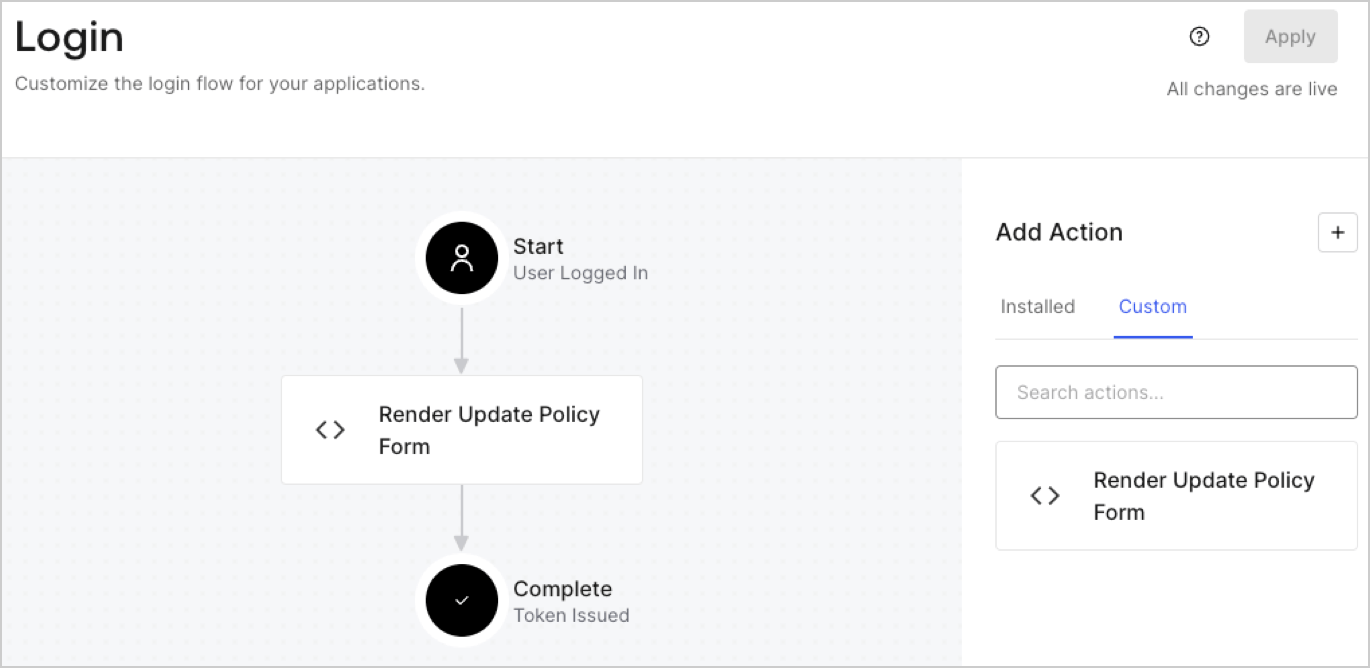
Create a post-login Action to render your form by following these steps:

1. Navigate to **Auth0 Dashboard > Actions > Flows > Login.**
2. Select the **+** icon and Select **Build from scratch**:

   * **Name**: Enter `Render Update Policy Form`.
   * **Trigger**: Select `Login / Post Login`.
   * **Runtime**: Select the recommended version.
3. Select **Create**.

To configure the post-login Action:

1. Delete the existing code from the Code editor.
2. Paste the form render code into the Code editor.
3. Edit the code to define the conditional logic that will render the form.

   ```javascript lines theme={null}
   /**
   * @param {Event} event - Details about the user and the context in which they are logging in.
   * @param {PostLoginAPI} api - Interface whose methods can be used to change the behavior of the login.
   */
   exports.onExecutePostLogin = async (event, api) => {
     const FORM_ID = 'REPLACE_WITH_YOUR_FORM_ID';

     if (event.user.app_metadata.privacy_policies !== true) {
       api.prompt.render(FORM_ID);
     }
   }

   exports.onContinuePostLogin = async (event, api) => { }
   ```

   <Callout icon="file-lines" color="#0EA5E9" iconType="regular">
     The example code above will render the form when a user is missing the app metadata `privacy_policies` property.
   </Callout>
4. Select **Deploy.**
5. Drag and Drop the **Render Update Policy Form** Action to the **Login** flow.
   <Frame>
     <img src="https://mintcdn.com/docs-dev-feat-docs-5554-self-service/f5M4QlP6h-hLtYB2/docs/images/cdy7uua7fh8z/5TOwDgevZsBqd7yZynUYWU/41ca909dc3007aed4f40ff794a05efa5/postlogin.png?fit=max&auto=format&n=f5M4QlP6h-hLtYB2&q=85&s=d87985ccd3de281aeb78990c72884bf9" alt="Dashboard > Forms > Use Case > Render update policy form login action" data-og-width="1370" width="1370" data-og-height="668" height="668" data-path="docs/images/cdy7uua7fh8z/5TOwDgevZsBqd7yZynUYWU/41ca909dc3007aed4f40ff794a05efa5/postlogin.png" data-optimize="true" data-opv="3" srcset="https://mintcdn.com/docs-dev-feat-docs-5554-self-service/f5M4QlP6h-hLtYB2/docs/images/cdy7uua7fh8z/5TOwDgevZsBqd7yZynUYWU/41ca909dc3007aed4f40ff794a05efa5/postlogin.png?w=280&fit=max&auto=format&n=f5M4QlP6h-hLtYB2&q=85&s=cd3b62841529454a521ba3350600ad36 280w, https://mintcdn.com/docs-dev-feat-docs-5554-self-service/f5M4QlP6h-hLtYB2/docs/images/cdy7uua7fh8z/5TOwDgevZsBqd7yZynUYWU/41ca909dc3007aed4f40ff794a05efa5/postlogin.png?w=560&fit=max&auto=format&n=f5M4QlP6h-hLtYB2&q=85&s=44e580922305b2fea61c375ee8a6edaf 560w, https://mintcdn.com/docs-dev-feat-docs-5554-self-service/f5M4QlP6h-hLtYB2/docs/images/cdy7uua7fh8z/5TOwDgevZsBqd7yZynUYWU/41ca909dc3007aed4f40ff794a05efa5/postlogin.png?w=840&fit=max&auto=format&n=f5M4QlP6h-hLtYB2&q=85&s=abb2978f16e38f5e8a0ae00c31f76a33 840w, https://mintcdn.com/docs-dev-feat-docs-5554-self-service/f5M4QlP6h-hLtYB2/docs/images/cdy7uua7fh8z/5TOwDgevZsBqd7yZynUYWU/41ca909dc3007aed4f40ff794a05efa5/postlogin.png?w=1100&fit=max&auto=format&n=f5M4QlP6h-hLtYB2&q=85&s=22bff79258e252272c0924a79e1e3875 1100w, https://mintcdn.com/docs-dev-feat-docs-5554-self-service/f5M4QlP6h-hLtYB2/docs/images/cdy7uua7fh8z/5TOwDgevZsBqd7yZynUYWU/41ca909dc3007aed4f40ff794a05efa5/postlogin.png?w=1650&fit=max&auto=format&n=f5M4QlP6h-hLtYB2&q=85&s=b60acbb1178d6c30a8d2c6fd13e2eacd 1650w, https://mintcdn.com/docs-dev-feat-docs-5554-self-service/f5M4QlP6h-hLtYB2/docs/images/cdy7uua7fh8z/5TOwDgevZsBqd7yZynUYWU/41ca909dc3007aed4f40ff794a05efa5/postlogin.png?w=2500&fit=max&auto=format&n=f5M4QlP6h-hLtYB2&q=85&s=77549d38cafffb04892a626f2c0df08e 2500w" />
   </Frame>
6. Select **Apply.**

### Test implementation

Test the implementation by following these steps:

1. Log in with an existing user whose app`_metadata` attribute `privacy_policies` does not have a value.
2. The post-login Action in the Login flow will render the form and prompt for acceptance.
3. Select **Auth0 Dashboard > User Management > Users,** locate the user and verify that the `app_metadata` attribute `privacy_policies` contains a `true` value and a timestamp.
