> ## Documentation Index
> Fetch the complete documentation index at: https://docs-dev-feat-docs-5554-self-service.mintlify.site/llms.txt
> Use this file to discover all available pages before exploring further.
> Learn how to rotate an application's client secret using the Auth Dashboard or the Management API.
# Rotate Client Secrets
export const AuthCodeGroup = ({children, dropdown}) => {
const [processedChildren, setProcessedChildren] = useState(children);
useEffect(() => {
let unsubscribe = null;
function init() {
unsubscribe = window.autorun(() => {
const processChildren = node => {
if (typeof node === "string") {
let processedNode = node;
for (const [key, value] of window.rootStore.variableStore.values.entries()) {
const escapedKey = key.replaceAll(/[.*+?^${}()|[\]\\]/g, (String.raw)`\$&`);
processedNode = processedNode.replaceAll(new RegExp(escapedKey, "g"), value);
}
return processedNode;
} else if (Array.isArray(node)) {
return node.map(processChildren);
} else if (node && node.props && node.props.children) {
return {
...node,
props: {
...node.props,
children: processChildren(node.props.children)
}
};
}
return node;
};
setProcessedChildren(processChildren(children));
});
}
if (window.rootStore) {
init();
} else {
window.addEventListener("adu:storeReady", init);
}
return () => {
window.removeEventListener("adu:storeReady", init);
unsubscribe?.();
};
}, [children]);
return {processedChildren};
};
export const AuthCodeBlock = ({filename, icon, language, highlight, children}) => {
const [displayText, setDisplayText] = useState(children);
const [copyText, setCopyText] = useState(children);
const wrapperRef = React.useRef(null);
useEffect(() => {
let unsubscribe = null;
function init() {
if (!window.autorun || !window.rootStore) {
return;
}
unsubscribe = window.autorun(() => {
let processedChildrenForDisplay = children;
let processedChildrenForCopy = children;
for (const [key, value] of window.rootStore.variableStore.values.entries()) {
const escapedKey = key.replaceAll(/[.*+?^${}()|[\]\\]/g, (String.raw)`\$&`);
let displayValue = value;
if (key === "{yourClientSecret}" && value !== "{yourClientSecret}") {
displayValue = value.substring(0, 3) + "*****MASKED*****";
}
processedChildrenForDisplay = processedChildrenForDisplay.replaceAll(new RegExp(escapedKey, "g"), displayValue);
processedChildrenForCopy = processedChildrenForCopy.replaceAll(new RegExp(escapedKey, "g"), value);
}
setDisplayText(processedChildrenForDisplay);
setCopyText(processedChildrenForCopy);
});
}
if (window.rootStore) {
init();
} else {
window.addEventListener("adu:storeReady", init);
}
return () => {
window.removeEventListener("adu:storeReady", init);
unsubscribe?.();
};
}, [children]);
useEffect(() => {
if (!wrapperRef.current) return;
const originalWriteText = navigator.clipboard.writeText.bind(navigator.clipboard);
let isOverriding = false;
const handleClick = e => {
const button = e.target.closest('[data-testid="copy-code-button"]');
if (!button || !wrapperRef.current.contains(button)) return;
isOverriding = true;
navigator.clipboard.writeText = text => {
if (isOverriding) {
isOverriding = false;
navigator.clipboard.writeText = originalWriteText;
return originalWriteText(copyText);
}
return originalWriteText(text);
};
setTimeout(() => {
if (isOverriding) {
isOverriding = false;
navigator.clipboard.writeText = originalWriteText;
}
}, 100);
};
const wrapper = wrapperRef.current;
wrapper.addEventListener('click', handleClick, true);
return () => {
wrapper.removeEventListener('click', handleClick, true);
if (navigator.clipboard.writeText !== originalWriteText) {
navigator.clipboard.writeText = originalWriteText;
}
};
}, [copyText]);
return
{displayText}
;
};
You can change an application's client secret using the Auth0 Dashboard or the Auth0 Management API. When you rotate a client secret, you must update any authorized applications with the new value.
Client secrets should not be stored in public client applications. To learn more, read [Confidential and Public Applications.](/docs/get-started/applications/confidential-and-public-applications)
New secrets may be delayed up to thirty seconds while rotating. During this propagation window, either the old or the new secret may be accepted, so your application should be configured to try both. To avoid downtime, deploy the new secret to your application *before* it becomes active. The recommended approach is to set a custom client secret in advance (see [Set a custom client secret](#set-a-custom-client-secret)): store the future secret in your application's code/system configuration as a fallback so it's already deployed when the rotation takes effect. Your app can then use whichever secret succeeds—if a request fails with the old secret, it falls back to the new one.
Secrets can be stored in a list (or similar structure) until they're no longer needed. Once you're sure that an old secret is obsolete, you can remove its value from your app's code.
## Use the Dashboard
1. In the Auth0 Dashboard, go to [Applications > Applications](https://manage.auth0.com/#/applications), and then select the name of the application to view.
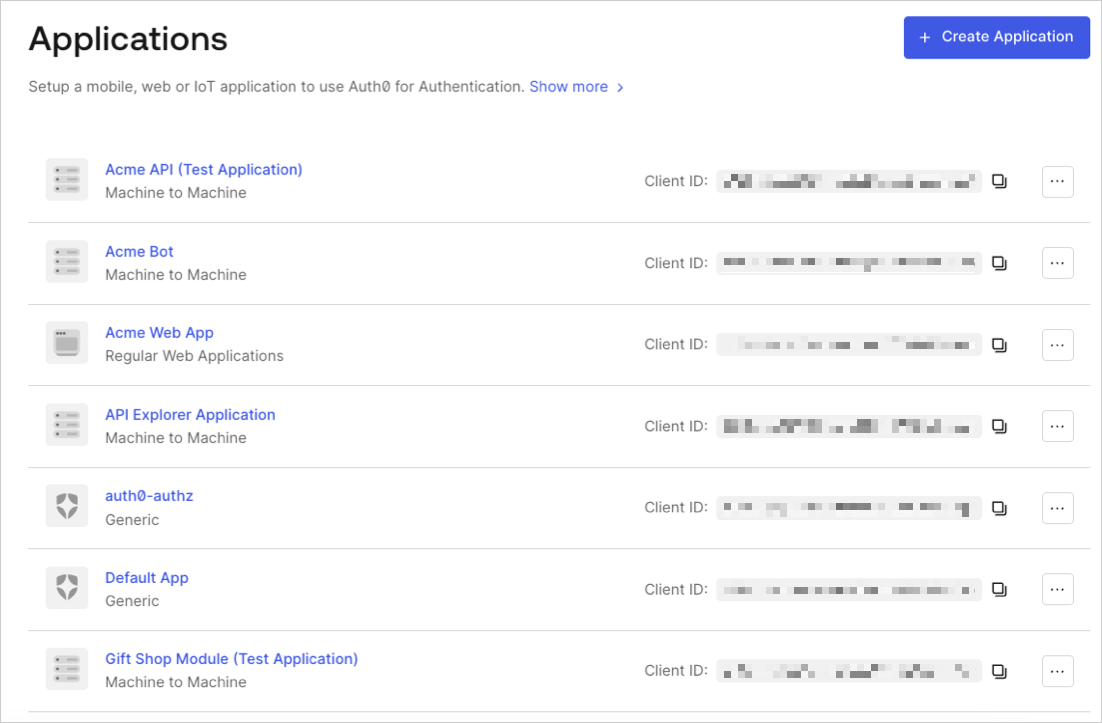 2. Scroll to the bottom of the **Settings** page, locate the **Danger Zone**, select **Rotate**, and confirm.
3. Scroll to the top of the page, and switch to the **Credentials** tab.
4. View your new secret by locating **Client Secret**, and selecting the eye icon.
2. Scroll to the bottom of the **Settings** page, locate the **Danger Zone**, select **Rotate**, and confirm.
3. Scroll to the top of the page, and switch to the **Credentials** tab.
4. View your new secret by locating **Client Secret**, and selecting the eye icon.
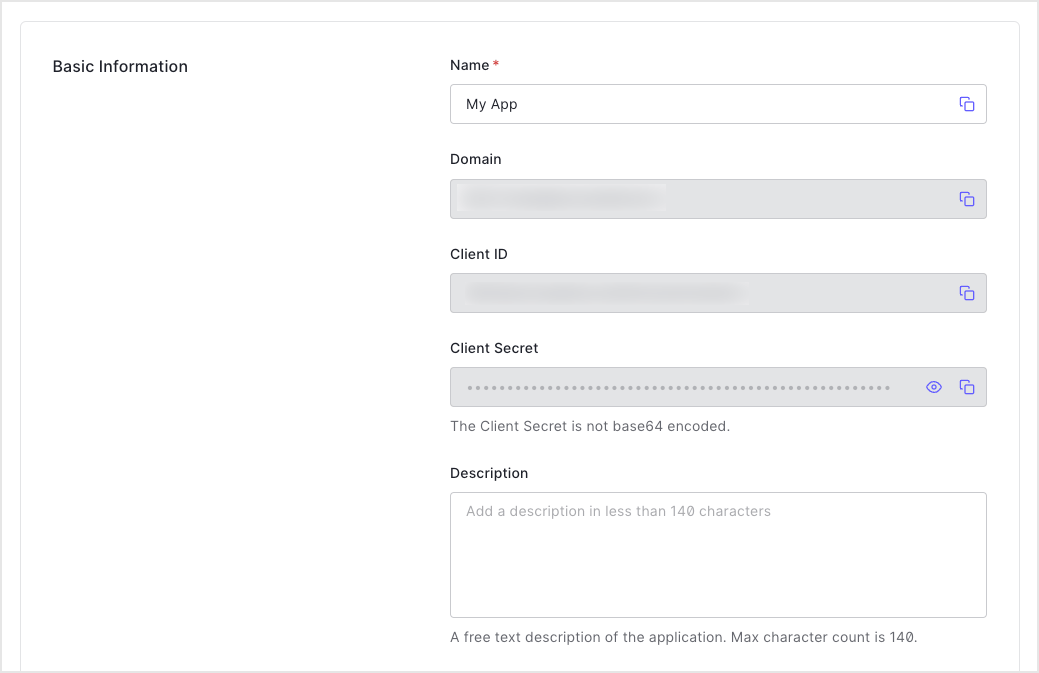 5. Update authorized applications with the new value.
## Use the Management API
1. Call the Management API [Rotate a client secret](https://auth0.com/docs/api/management/v2#!/Clients/post_rotate_secret) endpoint. Replace the `{yourClientId}` and `{yourMgmtApiAccessToken}` placeholder values with your client ID and Management API access token, respectively.
```bash cURL theme={null}
curl --request POST \
--url 'https://{yourDomain}/api/v2/clients/{yourClientId}/rotate-secret' \
--header 'authorization: Bearer {yourMgmtApiAccessToken}'
```
```csharp C# theme={null}
var client = new RestClient("https://{yourDomain}/api/v2/clients/{yourClientId}/rotate-secret");
var request = new RestRequest(Method.POST);
request.AddHeader("authorization", "Bearer {yourMgmtApiAccessToken}");
IRestResponse response = client.Execute(request);
```
```go Go theme={null}
package main
import (
"fmt"
"net/http"
"io/ioutil"
)
func main() {
url := "https://{yourDomain}/api/v2/clients/{yourClientId}/rotate-secret"
req, _ := http.NewRequest("POST", url, nil)
req.Header.Add("authorization", "Bearer {yourMgmtApiAccessToken}")
res, _ := http.DefaultClient.Do(req)
defer res.Body.Close()
body, _ := ioutil.ReadAll(res.Body)
fmt.Println(res)
fmt.Println(string(body))
}
```
```java Java theme={null}
HttpResponse response = Unirest.post("https://{yourDomain}/api/v2/clients/{yourClientId}/rotate-secret")
.header("authorization", "Bearer {yourMgmtApiAccessToken}")
.asString();
```
```javascript Node.JS theme={null}
var axios = require("axios").default;
var options = {
method: 'POST',
url: 'https://{yourDomain}/api/v2/clients/{yourClientId}/rotate-secret',
headers: {authorization: 'Bearer {yourMgmtApiAccessToken}'}
};
axios.request(options).then(function (response) {
console.log(response.data);
}).catch(function (error) {
console.error(error);
});
```
```php PHP theme={null}
$curl = curl_init();
curl_setopt_array($curl, [
CURLOPT_URL => "https://{yourDomain}/api/v2/clients/{yourClientId}/rotate-secret",
CURLOPT_RETURNTRANSFER => true,
CURLOPT_ENCODING => "",
CURLOPT_MAXREDIRS => 10,
CURLOPT_TIMEOUT => 30,
CURLOPT_HTTP_VERSION => CURL_HTTP_VERSION_1_1,
CURLOPT_CUSTOMREQUEST => "POST",
CURLOPT_HTTPHEADER => [
"authorization: Bearer {yourMgmtApiAccessToken}"
],
]);
$response = curl_exec($curl);
$err = curl_error($curl);
curl_close($curl);
if ($err) {
echo "cURL Error #:" . $err;
} else {
echo $response;
}
```
```python Python theme={null}
import http.client
conn = http.client.HTTPSConnection("")
headers = { 'authorization': "Bearer {yourMgmtApiAccessToken}" }
conn.request("POST", "/{yourDomain}/api/v2/clients/%7ByourClientId%7D/rotate-secret", headers=headers)
res = conn.getresponse()
data = res.read()
print(data.decode("utf-8"))
```
```ruby Ruby theme={null}
require 'uri'
require 'net/http'
require 'openssl'
url = URI("https://{yourDomain}/api/v2/clients/%7ByourClientId%7D/rotate-secret")
http = Net::HTTP.new(url.host, url.port)
http.use_ssl = true
http.verify_mode = OpenSSL::SSL::VERIFY_NONE
request = Net::HTTP::Post.new(url)
request["authorization"] = 'Bearer {yourMgmtApiAccessToken}'
response = http.request(request)
puts response.read_body
```
| Value | Description |
| ----------------------- | ---------------------------------------------------------------------------------------------------------------------------- |
| `{yourClientId}` | Τhe ID of the application to be updated. |
| `MGMT_API_ACCESS_TOKEN` | [Access Tokens for the Management API](https://auth0.com/docs/api/management/v2/tokens) with the scope `update:client_keys`. |
2. Update authorized applications with the new value.
### Set a custom client secret
You can use the Management API [Update a client](https://auth0.com/docs/api/management/v2/#!/Clients/patch_clients_by_id) endpoint to to set a client secret manually instead of requesting a rotation to an automatically generated secret. Your application is configured with the future secret as a fallback ahead of the actual rotation.
```bash lines theme={null}
curl --request PATCH \
--url https://{TenantDomain}/api/v2/clients/{ClientID} \
--header 'Authorization: Bearer {AccessToken}' \
--header 'Content-Type: application/json' \
--data '{
"client_secret": "{CustomClientSecret}"
}'
```
## Learn more
* [View Signing Certificates](/docs/get-started/tenant-settings/signing-keys/view-signing-certificates)
* [Signing Algorithms](/docs/get-started/applications/signing-algorithms)
* [Change Application Signing Algorithms](/docs/get-started/applications/change-application-signing-algorithms)
5. Update authorized applications with the new value.
## Use the Management API
1. Call the Management API [Rotate a client secret](https://auth0.com/docs/api/management/v2#!/Clients/post_rotate_secret) endpoint. Replace the `{yourClientId}` and `{yourMgmtApiAccessToken}` placeholder values with your client ID and Management API access token, respectively.
```bash cURL theme={null}
curl --request POST \
--url 'https://{yourDomain}/api/v2/clients/{yourClientId}/rotate-secret' \
--header 'authorization: Bearer {yourMgmtApiAccessToken}'
```
```csharp C# theme={null}
var client = new RestClient("https://{yourDomain}/api/v2/clients/{yourClientId}/rotate-secret");
var request = new RestRequest(Method.POST);
request.AddHeader("authorization", "Bearer {yourMgmtApiAccessToken}");
IRestResponse response = client.Execute(request);
```
```go Go theme={null}
package main
import (
"fmt"
"net/http"
"io/ioutil"
)
func main() {
url := "https://{yourDomain}/api/v2/clients/{yourClientId}/rotate-secret"
req, _ := http.NewRequest("POST", url, nil)
req.Header.Add("authorization", "Bearer {yourMgmtApiAccessToken}")
res, _ := http.DefaultClient.Do(req)
defer res.Body.Close()
body, _ := ioutil.ReadAll(res.Body)
fmt.Println(res)
fmt.Println(string(body))
}
```
```java Java theme={null}
HttpResponse response = Unirest.post("https://{yourDomain}/api/v2/clients/{yourClientId}/rotate-secret")
.header("authorization", "Bearer {yourMgmtApiAccessToken}")
.asString();
```
```javascript Node.JS theme={null}
var axios = require("axios").default;
var options = {
method: 'POST',
url: 'https://{yourDomain}/api/v2/clients/{yourClientId}/rotate-secret',
headers: {authorization: 'Bearer {yourMgmtApiAccessToken}'}
};
axios.request(options).then(function (response) {
console.log(response.data);
}).catch(function (error) {
console.error(error);
});
```
```php PHP theme={null}
$curl = curl_init();
curl_setopt_array($curl, [
CURLOPT_URL => "https://{yourDomain}/api/v2/clients/{yourClientId}/rotate-secret",
CURLOPT_RETURNTRANSFER => true,
CURLOPT_ENCODING => "",
CURLOPT_MAXREDIRS => 10,
CURLOPT_TIMEOUT => 30,
CURLOPT_HTTP_VERSION => CURL_HTTP_VERSION_1_1,
CURLOPT_CUSTOMREQUEST => "POST",
CURLOPT_HTTPHEADER => [
"authorization: Bearer {yourMgmtApiAccessToken}"
],
]);
$response = curl_exec($curl);
$err = curl_error($curl);
curl_close($curl);
if ($err) {
echo "cURL Error #:" . $err;
} else {
echo $response;
}
```
```python Python theme={null}
import http.client
conn = http.client.HTTPSConnection("")
headers = { 'authorization': "Bearer {yourMgmtApiAccessToken}" }
conn.request("POST", "/{yourDomain}/api/v2/clients/%7ByourClientId%7D/rotate-secret", headers=headers)
res = conn.getresponse()
data = res.read()
print(data.decode("utf-8"))
```
```ruby Ruby theme={null}
require 'uri'
require 'net/http'
require 'openssl'
url = URI("https://{yourDomain}/api/v2/clients/%7ByourClientId%7D/rotate-secret")
http = Net::HTTP.new(url.host, url.port)
http.use_ssl = true
http.verify_mode = OpenSSL::SSL::VERIFY_NONE
request = Net::HTTP::Post.new(url)
request["authorization"] = 'Bearer {yourMgmtApiAccessToken}'
response = http.request(request)
puts response.read_body
```
| Value | Description |
| ----------------------- | ---------------------------------------------------------------------------------------------------------------------------- |
| `{yourClientId}` | Τhe ID of the application to be updated. |
| `MGMT_API_ACCESS_TOKEN` | [Access Tokens for the Management API](https://auth0.com/docs/api/management/v2/tokens) with the scope `update:client_keys`. |
2. Update authorized applications with the new value.
### Set a custom client secret
You can use the Management API [Update a client](https://auth0.com/docs/api/management/v2/#!/Clients/patch_clients_by_id) endpoint to to set a client secret manually instead of requesting a rotation to an automatically generated secret. Your application is configured with the future secret as a fallback ahead of the actual rotation.
```bash lines theme={null}
curl --request PATCH \
--url https://{TenantDomain}/api/v2/clients/{ClientID} \
--header 'Authorization: Bearer {AccessToken}' \
--header 'Content-Type: application/json' \
--data '{
"client_secret": "{CustomClientSecret}"
}'
```
## Learn more
* [View Signing Certificates](/docs/get-started/tenant-settings/signing-keys/view-signing-certificates)
* [Signing Algorithms](/docs/get-started/applications/signing-algorithms)
* [Change Application Signing Algorithms](/docs/get-started/applications/change-application-signing-algorithms)